Pause and resume downloads (even broken ones), keep your downloads organized and increase your download speed. The tool integrates with all the major browsers.
An efficient download manager needs to provide top download speeds, be compatible with all kinds of Internet connections, be capable of recovering and resuming broken downloads, be integrated with your favorite browser, and be designed so that all potential users can make the most of its full functionality. Internet Download Manager offers you not only all those features but also a full set of useful extra tools.
IDM has been designed to become the only download tool you will ever need to grab documents, archive files, video and audio files, apps, and even full webpages. Its high level of flexibility, downloading technology, and error recovery and resume capabilities make it stand out over other download managers. It works seamlessly with whatever Internet connection or protocol your PC might be using – proxy, ftp, http, firewalls, authorization processes, etc. – and adapts to your specific requirements as soon as you open it for the first time. IDM’s “smart download logic accelerator” combines dynamic file segmentation with a safe multipart downloading technology to offer you up to 5 times faster downloads. This allows the program to offer you state-of-the-art recovery and resume capabilities that will make sure that no broken or failed download is left unfinished for no longer than necessary. more
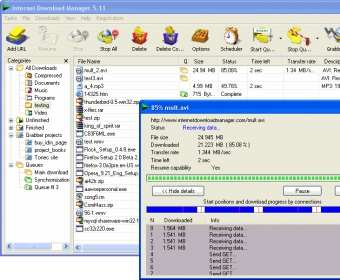
The program’s main interface – without being particularly attractive – is utterly functional and well structured. Only the somehow animated icons that take you to the program’s main sections add an informal touch to an overall classic design. Downloads are clearly listed on the main panel and neatly organized into categories according to various sets of default file extensions to which you can add your own easily. Unfinished, finished, queued, and grabbed projects complete the categories into which you can classify your downloads.
The program allows for various ways in which you can add documents and media files to the download list. You can add the URL of the page or document you’re interested in, you can drag and drop that URL onto the download list, use the IDM download options added to the context menu, or make use of the convenient button that appears close to your favorite videos on media sites.
Finally, it is worth noting two of the various extra tools that come with IDM, as they make a difference when compared to the many similar tools available – the site grabber and the download scheduler. IDM Site Grabber is an excellent utility that will allow you to download and save entire sites in a straightforward and efficient way. To help you make the most of it, this tool comes with a wizard-like interface and a set of profiles that will grab an entire site, the video and audio files embedded in it, all the documents, only the text, etc. All of these profiles allow for customization – thus, you can tell the site grabber to download also all the files and HTML pages associated to the links present in the site for offline browsing. As for the download scheduler, it lets you manage and synchronize your queues, set up download limits, and – best of all – configure download start and stop times, the number of retries, the times and days of the week when downloading routines will be enabled, and the action will be well done.
Internet Download Manager is much more than just another download management tool – it is a download accelerator that offers you the best download technology available, together with a set of tools and features that would make many other similar apps pale in comparison.








Comments (304)
Facebook comments